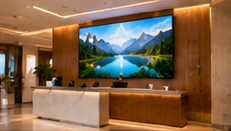

Hotel digital signage hardware must do more than simply display content—it must suit the unique lighting, space, and operational realities of each location. A bright, sunlit lobby, a reflective lift waiting area, and a banquet entrance that shifts with every event all challenge screen selection and setup in different ways. If your displays are hard to read, poorly mounted, or disrupt daily operations, guests and staff will notice.
This article walks through practical hardware considerations for these three key hospitality zones, with concrete criteria, a movable screen setup checklist, and a daily startup test to ensure reliable operation—without recommending a specific model. By focusing on what to check, not just what to buy, you can make informed choices for each scenario.
Key Takeaways
- Screen brightness, orientation and mounting must match actual lighting and guest flow in each hotel area.
- Movable banquet displays need secure stands, cable management, and a repeatable setup checklist for each use.
- Daily startup checks prevent avoidable downtime and ensure content is visible and current before guests arrive.
Lobby Displays: Prioritise Brightness and Viewing Angle
The hotel lobby is often sunlit, with guests viewing displays from multiple angles. For this space:
- Brightness: Choose screens rated for high brightness (at least 500 nits or above; verify against actual lighting conditions) to combat glare from windows and lights.
- Viewing Angle: Opt for panels with wide viewing angles (ideally 178° horizontal/vertical) so content remains visible from the reception, seating, and entrance.
- Mounting: Use professional wall mounts or floor stands that match lobby aesthetics and keep cables hidden or protected.
- Orientation: Decide between portrait or landscape based on content (e.g., welcome messages or directories may suit portrait; promotional videos often use landscape).
- Duty Hours: Confirm the screen is rated for 16/7 or 24/7 use, depending on your lobby’s traffic and operational hours.
- Service Access: Ensure that there’s sufficient space behind or beside the screen for cleaning and maintenance without disrupting lobby flow.
Lift Waiting Areas: Handle Reflections and Tight Spaces
Lift lobbies and waiting areas are typically smaller, often with glossy or mirrored finishes. Here, the main issues are visibility and space:
- Anti-Glare Panel: Choose screens with matte finishes or anti-glare coatings to reduce reflections from ambient lighting or mirrored walls.
- Compact Mounting: Use slim wall mounts to avoid obstructing passageways. For very tight spaces, consider recessed or flush mounting.
- Cable Paths: Route power and data cables through wall conduits or protective raceways to prevent tripping hazards and maintain a tidy look.
- Viewing Height: Mount displays at eye level for standing adults (typically 1.5-1.7m from the floor to the screen centre) to maximise engagement.
- Short Duty Hours: If the area is only busy during certain periods, hardware rated for 12/7 use may suffice, but confirm this matches your actual schedule.
- Service Access: Ensure the installation allows for quick removal or servicing, as lift areas are safety-critical and must remain uncluttered.
Banquet Entrances: Movable and Event-Ready
Banquet entrances are dynamic, requiring displays that can be moved, reoriented, and repurposed for each event. Here’s what to assess:
- Mobile Stand: Use sturdy, lockable stands with wide bases for stability. Wheels should lock securely and roll smoothly on carpet or tile.
- Flexible Orientation: Choose screens and mounts that allow quick switching between portrait and landscape without tools.
- Cable Management: Use cable wraps, floor cable covers, or wireless solutions to avoid exposed wires in guest areas.
- Quick Connection: Standardise on plug-and-play power and data connections to minimise setup time and reduce errors.
- Serviceability: Ensure staff can access the player and screen controls without dismantling the entire setup.
Movable Screen Setup Checklist
On smaller screens, scroll sideways to view every column.| Step | What to Check | Who | Tick When Done |
|---|---|---|---|
| 1 | Position stand at entrance, lock wheels | Banquet staff | |
| 2 | Adjust screen to correct orientation (portrait/landscape) | AV/IT staff | |
| 3 | Connect power/data cables and secure with covers | AV/IT staff | |
| 4 | Check content playback and screen brightness | AV/IT staff | |
| 5 | Test for trip hazards and clear signage area | Banquet staff |
Daily Startup Test: Keep Screens Guest-Ready
Before guests arrive, a quick morning check avoids embarrassing failures. Here’s a sample test:
- Power on all screens and confirm startup (look for any error indicators).
- Verify content loads correctly (including offline playback if network is down).
- Check brightness, contrast, and sound (if used) in actual lighting conditions.
- Inspect cables and stands for safety and appearance.
- Log any issues for prompt resolution before peak hours.
Common Failure: Ignoring Environmental Fit
One of the most frequent mistakes is selecting screens based only on size or price, without factoring in ambient light, reflections, or mounting restrictions. For example, a standard screen may look washed out in a sunlit lobby, or cause disruptive glare in a mirrored lift area. Always test shortlisted models in the actual installation spot before final purchase.
Conclusion
Success with hotel digital signage hardware depends on matching each screen’s capabilities to its environment, operational demands, and daily use patterns. By using clear criteria and checklists, you can avoid costly mistakes and ensure guests see your content at its best, wherever they are in your property.
Related Reading
- Hotel Signage: A 90-Day Lobby and Banquet Rollout
- Hotel Signage Privacy: Guest and Event Information Checks
Try this with your own screens
During your demo or trial, position a test screen in your lobby or banquet area at the intended height and orientation. Assess content visibility at different times of day and from multiple guest viewing angles, and note any glare or mounting issues.
Discuss your setup for your screen requirements.




